Integrate your practice management system with Class to automate client onboarding, keep data in sync, and streamline workflows. This guide walks you through how the integration works, how to get started, and the most common API tasks—with copy-paste request examples.
The following structure of data in Class: Businesscode = Practise
Objectives of this type of integration
- Automate data sync of Class entities and Class contacts in sync with other Practise Management systems and/or CRMs.
- Reducing manual entry by ensuring that a change in the CRM can be updated in Class, or updates in Class can be used to compare and update the CRM.
- Enable practise management systems by continually relaying the entity's status on Class - contacts and displayed information - to the practise management system.
What you’ll build:
- Secure authentication using OAuth 2.0 (Authorisation Code flow).
- Entity linking to create or update clients and related entities (e.g., SMSFs).
- Data sync to fetch fund and client details and push updates back to Class.
High-level flow:
- Authenticate – Obtain an access token with the required scopes.
- Link entities – Create or update clients, funds, and relationships.
- Sync data – Pull details from Class, map fields, and update as needed.
- Client ID & Secret (generated when you create your developer app)
- Redirect URL (registered in your app)
- Scopes (aligned to the endpoints you’ll call)
- Base URL for your environment (e.g.,
https://api.class.com.au)
In Class, we organise our data according to the Accounting entities. Often called funds, but may represent any entity type, such as SMSF, Trust, Company, Personal or Partnership. Each of these entities may have one or more relationships with contacts, and may also have some special roles based on the entity type/Class product.
We group Accounting entities together in what we call a business. This may represent and accounting firm, administration firm or financial planning practise. It is possible that one of these firms may have one or more businesses on Class. Our OAuth permissions are granted per business code and any related tokens will be scoped to only information relating to that one business. If you client has more than one Class business, then you will need to obtain an authorisation for each business and manage the tokens seperately for each business.
A business will have its own contacts. Contact types are either organisations or person. Contacts normally relate to the staff working on the entities or organisations servicing the entities.
A fund (entity) will also have its own contacts, again either organisation or person. These contacts normally relate to the entity itself. Business contacts can also be related to a fund, and will appear on the fund contacts due to the relationship.
The following is a basic relationship structure of contact data in Class: 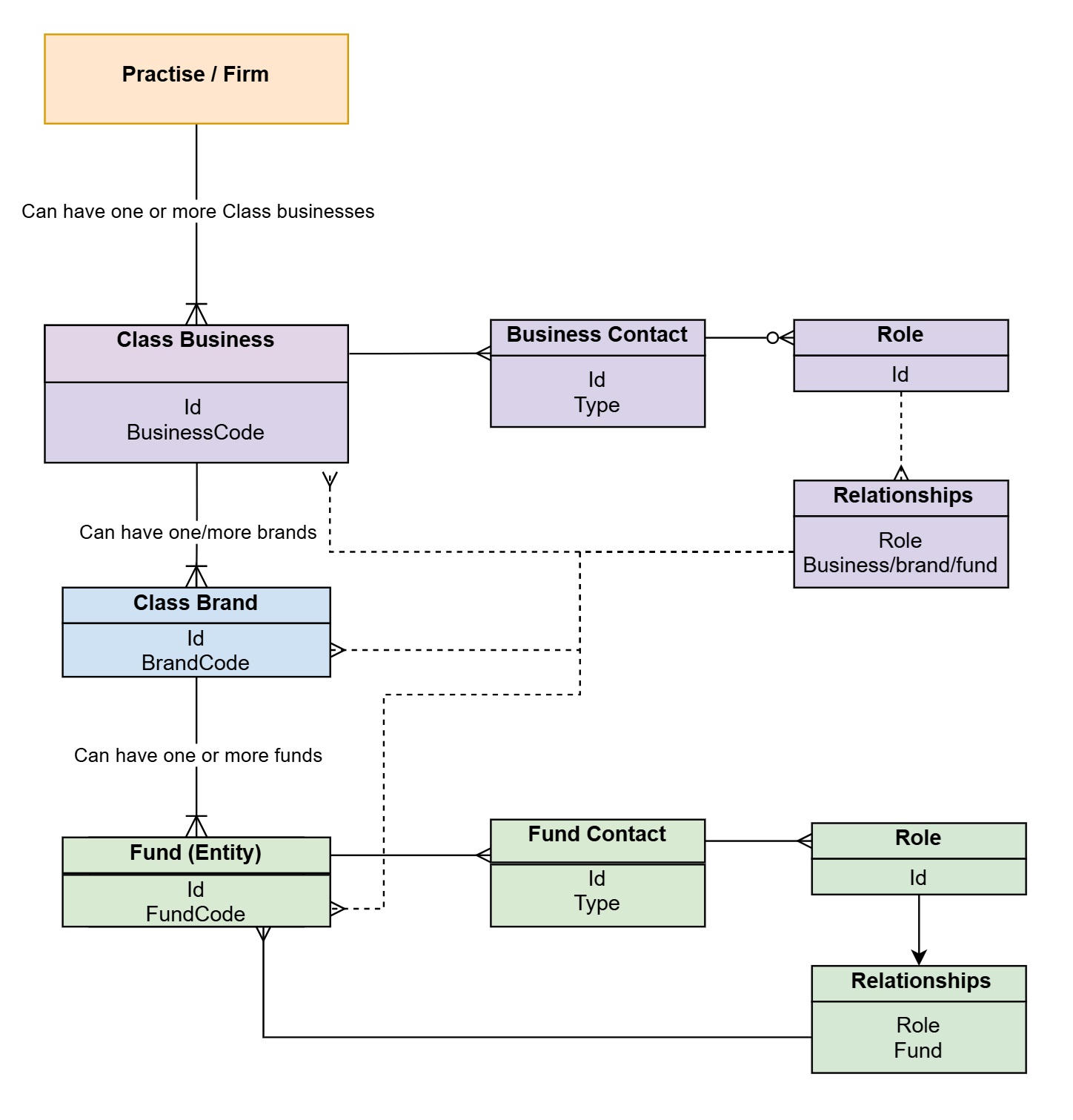
Name, code, start date, on system date, ABN, address details.
| Entity Type | Roles (examples) | OAuth Scope | Notes |
|---|---|---|---|
| Business | Accountant/Bookkeeper, Access Controller, Administrator, Adviser, Tax Agent, Auditor, Auditor Admin -------------------------------------------------------- **Fund roles within business contacts: **Reversionary Beneficiary, **Director, **Investor | business.details.read | User must be Access Controller |
| Fund (SMSF) | Member, **Reversionary Beneficiary | fund.details.read | |
| Fund (TRUST) | Beneficiary | fund.details.read | |
| Fund (Portfolio) | **Director, **Investor | fund.details.read |
- Get an OAuth 2.0 access token with the required scopes for your business.
- Create or update clients, funds and relationships
- Each entity would have a unique ID, but generally in Class we used the business code and fund code to identity the entity.
- Can sync entity details, entity contacts and other information such as period update status or tax lodgment status.
- Could even consider investment information, trustee details, beneficiary nominations, member balances or other information.
- Do you want to do this on the fly or do you want to schedule a daily overnight sync?
- Pull details from Class, map fields, and update CRM as needed.
- Explore the full API documentation for commonly used endpoints.
- Import endpoints into Postman for quick testing:

- Visit our Support Center for troubleshooting and FAQs.
- Contact our API support team for integration assistance.